AT&T Modem & Router Lights: Explained with Pictures


Every AT&T modem and router comes with a set of LED lights like Power, Ethernet, DSL, Internet, etc. Usually, each symbol stays solid green when working properly. However, if something is wrong, like the AT&T internet is slow, status lights on the modem or router might blink or turn off.
Based on a particular icon’s light color and state, you can identify its problem, cause, and fix it. Thus it is crucial to first understand all AT&T status lights, their significance, ideal states, problematic states, possible causes & solutions.
👉 Related reading: Does AT&T WiFi Extender Work with Any Router?
ATT Modem Lights
AT&T Modem Lights: Meanings, States, Fixes
In the subsequent sections, I shall discuss all of the AT&T modem lights one by one along with relevant helpful information.
1. Power Light
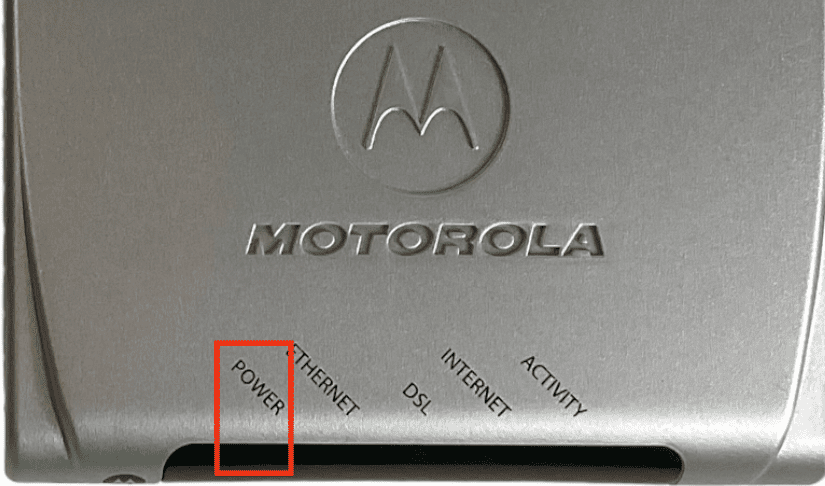
- Meaning: The modem is powered on
- Ideal Light Color: Solid Green
Different States of Power Light and Their Meanings:
- Solid Green: Modem is in operational mode and is powered on
- Solid Red: Modem has malfunctioned
- Flashing Red: Self-test is in progress
- Light off: The modem is off
Steps to Fix if Power Light is in trouble:
- Try power cycling the device
- Unplug the device from the power source.
- Wait for some time
- Restart again.
2. Ethernet Light

- Meaning: The device is connected by ethernet
- Ideal Light Color: Solid Green
Different States of Ethernet Light and Their Meanings:
- Solid Green: The device is connected by ethernet to the modem.
- Flashing Green: Traffic between the connected device and modem.
- Flashing Green with DSL light: Hardware issue detected.
- Light off: The modem is off.
Steps to Fix if Ethernet Light is in trouble:
- Begin with restarting the device. If this did not help,
- You should check for the software update.
- If you find any, install it.
3. DSL Light

- Meaning: DSL signal is detected
- Ideal Light Color: Solid Green
Different States of DSL Light and Their Meanings:
- Solid Green: Modem is connected to the DSL
- Flashing Green: Modem is attempting to sync with the DSL
- Flashing Red: No DSL signal is detected
- Flashing Green/ Red: Modem failed to sync with DSL three times
- Flashing Red with ethernet status light: Hardware failure detected
- Solid Red: Hardware failure detected
- Light off: The modem is off
Steps to Fix if the DSL Light is in trouble:
- When the issue is in hardware, restarting might not help.
- You need to consult a technician for help in that case.
4. Internet Light

- Meaning: The device is connected to the AT&T internet
- Ideal Light Color: Solid Green
Different States of Internet Light and Their Meanings:
- Solid Green: Modem is connected to the internet
- Flashing Green: Modem is attempting to connect to the internet
- Solid Red: Modem cannot connect to the internet
- Light off: The modem is off
Steps to Fix if Internet Light is in trouble:
- Check with your local operator if the issue lies from their end.
- If not, restart the device and check for internet status again.
5. Activity Light

- Meaning: Inbound internet traffic
- Ideal Light Color: Flashing Green
Different States of Activity Light and Their Meanings:
- Flashing Green: Inbound internet traffic
- Light off: The modem is off or no inbound internet traffic
Steps to Fix if Activity Light is in trouble:
- This will be fixed most probably by rebooting the device.
- Unplug the modem from the power source.
- Wait for a few minutes.
- Restart it again.
ATT Router Symbols
AT&T Router Lights: Meanings, States, Fixes
Now, I will talk about all AT&T router lights one by one along with relevant helpful information.
1. Power Light
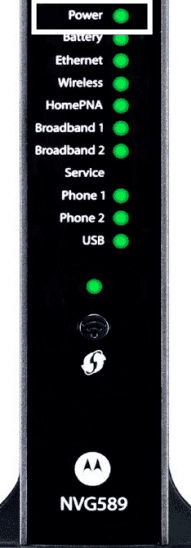
- Meaning: The gateway is powered on
- Ideal Light Color: Solid Green
Different States of Power Light and Their Meanings:
- Solid Green: Gateway is in operational mode and is powered on
- Solid Red: Gateway has malfunctioned
- Flashing Green: Gateway is trying to start
- Light off: The gateway is off
Steps to Fix if Power Light is in trouble:
- Try restarting/power cycling.
- Disconnect the power supply.
- Unplug the device.
- Wait for a few minutes.
- Restart the device.
- You can also factory reset the AT&T router if restarting did not help.
2. Ethernet Light

- Meaning: There is an active ethernet connection
- Ideal Light Color: Solid Green
Different States of Ethernet Light and Their Meanings:
- Solid Green: The device is connected to the ethernet port
- Flashing Green: Data traffic is passing from the connected device to the ethernet port
Steps to Fix if Ethernet Light is in trouble:
- Check ethernet cable
- Check that the ethernet cable is properly plugged into both the device and modem port.
- Try plugging the cable into a different port.
- You can use a different ethernet cable in case the first one is faulty.
3. Battery Light
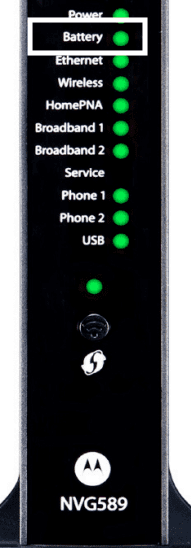
- Meaning: The battery is installed
- Ideal Light Color: Solid Green
Different States of Battery Light and Their Meanings:
- Solid Green: Battery is installed, but the gateway is not using the battery power
- Flashing Green: The battery is charging
- Flashing Amber: The gateway is using the battery power
Steps to Fix if Battery Light is in trouble:
- Switch off the device.
- Remove the plug from the power source.
- Wait for a few minutes.
- Plug the device again and restart it.
4. WiFi Light
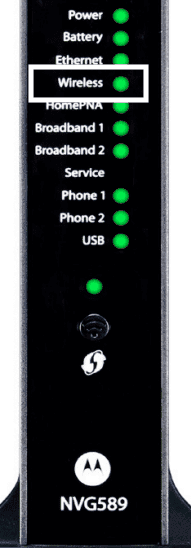
- Meaning: The device is connected
- Ideal Light Color: Solid Green
Different States of WiFi Light and Their Meanings:
- Solid Green: A device is connected using a wireless connection
- Flashing Green: Data traffic is passing from the connected device using a wireless connection
Steps to Fix if WiFi Light is in trouble:
- Reboot the device
- Restart again to check if the issue is gone.
5. Service Light
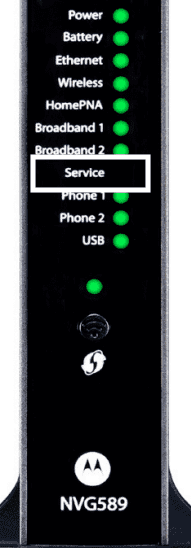
- Meaning: The service light on ATT router indicates it has obtained an IP address.
- Ideal Light Color: Solid Green
Different States of Service Light and Their Meanings:
- Solid Green: IP address has been obtained
- Solid or Blinking Red: The blinking red light on the AT&T router indicates that the internet service authentication has failed
- Fast Flashing Green: The gateway is trying to obtain the IP address
- Slow Flashing Green: The gateway is configured incorrectly.
Steps to Fix if Service Light is in trouble:
- Try restarting the device.
- Disconnect the power supply.
- Unplug the device.
- Wait for a few minutes.
- Restart the device.
- You can also factory reset the device if restarting does not help.
Note: If your device often faces lights flashing/connectivity issues, consider getting your own router for A&T internet. It would work much better than ISP-rented equipment.
Frequently Asked Questions
What colour should the light be on AT&T Modem?
Your AT&T modem should have a Solid Green light if it is connected to the internet and working properly. If the modem is showing a Flashing Green or Red light, this means the device is having a problem connecting to the internet.
How do I know if my ATT modem is working?
A Solid Green light on the AT&T modem means the device is working properly. In that case, you will be able to use the internet without any disruption.
What could be the reason behind AT&T modem all lights flashing red?
An interrupted firmware update, a glitch in a network connection, or hardware failure can make ATT modem lights flash red light. Try the fixes mentioned in the article above.
How do I troubleshoot my ATT modem?
Troubleshooting AT&T modem is not a big problem. To begin with, you must restart the device. Most of the time, the issue is fixed in this step only. If you still are facing difficulties connecting to the internet, you need to check for software and hardware issues as well. And lastly, contact a technician if nothing works.
Conclusion
By now, you must have a clear understanding of AT&T Uverse modem lights. Your device must show a Solid Green colour when working properly. Any other colour might signify there is some issue, and you must fix it. Hopefully, you now have an idea of the lights and how to troubleshoot them.